General Wage Increases are being implemented for certain employee groups. For key administrative dates, visit our status page.

Ergonomic Assessments

UBC's ergonomics team is available for individual ergonomic assessments of your workspace. The goal of the assessment is to improve your comfort and reduce your risk of musculoskeletal injuries while working. 

To request an ergonomics assessment, complete an ergonomics assessment request form to provide some background information. 

Request an ergonomics assessment

About the request form:

  • The form typically takes 10 to 15 minutes to complete.
  • For virtual or home office assessments, you will need to include some photos and measurements.
  • If you have any questions or difficulty completing the form, please contact the Ergonomics team.  

Who can request an assessment: 

  • We are able to provide ergonomic assessment for all UBC faculty, staff and students with an active paid appointment.
  • Ergonomic assessments are available for all UBC work environments including offices, home offices, laboratories, libraries, facilities, building services, dentistry, food services, child care, etc. 

Resources before requesting an ergonomics assessment:

  • Review our resources and office ergo webinar.to explore practical strategies for setting up your workstation effectively.
  • Speak with your manager about your concerns. They may be aware of additional resources available in your department.
  • Report a work-related injury if you believe that your injury was caused or significantly aggravated by your work. Please guidance on how to report, please refer to Accident/Incident reporting process.

What happens next:

  • After you submit your request, we'll contact you to schedule an assessment. The assessment typically takes up to one hour and includes a review of your concerns and an evaluation of your workstation. This may involve taking photos and measurements. Where possible, we'll make on-the-spot adjustments to improve your setup.
  • After the assessment, we will connect with your Manager to discuss recommendations and feasible solutions. Purchasing decisions are typically made by the department. A report will be shared with both you and your Manager. 


Ergonomics regulations, inspections and investigations

Report an incident

Ergonomic injuries (overexertion and repetitive strain injuries) account for over 40% of the days lost from WSBC accepted time loss claims. Report an incident on the UBC Safety and Risk Services website. 

Regulations

Musculoskeletal injury (MSI) risk factors are regulated under sections (4.46 to 4.53) of the BC Worker’s Compensation Act which places a legal responsibility on employers to identify factors in the workplace that may expose workers to a risk of MSI, assess the risk level and implement controls to eliminate or, if that is not practical, minimize the risk of musculoskeletal injury.

The purpose of the WSBC Ergonomics (MSI) Requirements (4.46 to 4.53) requirements is to eliminate or, if that is not practicable, minimize the risk of musculoskeletal injury to workers

Accident-incident investigations-ergo (MSI) related

Section 4.49 of the WSBC Ergonomics MSI Requirements outlines risk factors that must be considered, where applicable, in the identification and assessment of the risk of musculoskeletal injury (MSI). The information below is provided to assist you with your investigation, contact UBC’s Ergonomics Team if you require additional assistance.

Safe lifting

Find out how much is too much, and more. 

Manual material handling ergonomics

Manual Material Handling (MMH) tasks contribute to a large percentage of our WSBC time loss accepted injuries at UBC. It is important that both staff and supervisor recognize MMH hazards, follow safe working procedures and implement effective ergonomic interventions that eliminate or minimize the risk and impact of MMH injuries.

Visit the ergonomics training and workshops and register online for an ergonomic, accessibibility or movement training. 

Contact ergonomics.info@ubc.ca if you require additional assistance.

Risk factors (MSI)

There are several factors that impact the risk of developing a musculoskeletal injury (MSI). Risk factors are multiplicative; for example, awkward posture combined with force substantially increases strain on the body’s musculature system compared to either factor alone.

  • Posture
  • Force
  • Repetition & Static Load
  • Duration
  • Environment
  • Contact
  • Stress
  • Psychosocial

Posture

When considering the ergonomics of a workstation we look for a layout that facilitates a comfortable (neutral) working posture; workstations that require awkward postures not only increase the risk of musculoskeletal injury they also result in reduced efficiency. Not all awkward postures result in a high risk of musculoskeletal injury or reduced efficiency; whether changes need to be made will depend on how the risk factors interact.

Consider the following questions when looking for risk factors in your environment.

  • Does the task promote working in an awkward posture?
  • Does the layout of the work result in workers reaching away from their body or overhead?
  • Is the bench or table height adequate or does it promote bending, twisting or crouching?
  • How extreme is the awkward posture?
  • How frequent is that posture repeated or is it held for a sustained period of time?
  • Is any force applied while working in an awkward posture?

Risk factors are multiplicative: bending (awkward posture) combined with heavy lifting (force) places extreme stress on the spine.

Force

Your lifting powerzone is within mid-thigh to waist level. Heavy items should only be placed on the ground if they will be moved with a dolly and not lifted; if you will need lift a heavy item, it should be stored within your powerzone.

Determining if an item can be safely lifted depends on multiple factors; you can lift less weight overhead or from the ground as compared to at waist level; likewise, your strength capacity is less if the load is awkward or if there’s no hand hold to firmly grasp the object.

Consider the following questions when determining if an item can be safely lifted:

  • How heavy is the object?
  • Can you get in close?
  • Is the object at waist level or overhead or at ground level?
  • Is the object an awkward shape?
  • Can you get a good grip on the object?
  • How many times do you have to lift?
  • Can a dolly be used rather than lifting the item?

About musculoskeletal injuries

Musculoskeletal Injuries (MSIs), also known as Musculoskeletal Disorders (MSDs), are injuries that affect muscles, tendons and ligaments, nerves, blood vessels or related soft tissue. These injuries can occur from overexertion, such as when lifting a heavy box, or from repeatedly using the same muscles over and over again as is the case with Repetitive Strain Injuries (RSIs). Examples of MSIs include Rotator Cuff tendonitis, carpal tunnel syndrome and low back injuries involving ligaments, muscles or spinal discs.

MSIs make up approximately 30% of WorkSafe BC injury claims at UBC.

The Occupational Health & Safety Regulations require employers to identify and assess workplace risk factors in order to eliminate or if that is not practical, minimize, the risk of MSI to workers.

Ergonomics training and workshops

Office ergo videos: 

Ergo webinars and training specific to office environments


Accessibility webinars


Ergo orientations: DEPT specific

DEPT specific ergo orientations are available.  Each course contains five videos and each video is 5 to 10 minutes. After completing the quiz, you will receive a certificate of completion. 


Shiftwork and fatigue

This joint presentation with UBC's Occupation and Preventive Health team will provide you with tips and strategies to support your health when working shiftwork. 


Movement Breaks


Customized workshops

Please contact ergonomics.info@ubc.ca to discuss options to arrange a customized or DEPT specific ergonomic workshop. 

Sit-stand desk requests for medical reasons

UBC’s Stay at Work/Return to Work offers employees the support they need while managing a medical impairment or disability, and provides advice for supervisors who are working with an ill or injured faculty or staff member.

If you are an employee requesting a sit-stand desk for medical reasons

Please contact your Return to Work & Accommodations Advisor (RTWAA). Your RTWAA will assist you in collecting the necessary medical information, as a note from your healthcare provider recommending a sit-stand desk is generally not sufficient on its own. Your RTWAA will also work with you and your department to determine reasonable solutions to accommodate your medical limitations and restrictions.

If you are a supervisor who has an employee requesting a sit-stand desk for medical reasons

Please contact the Return to Work& Accommodations Advisor (RTWAA) that supports your department.  The RTWAA will guide you through the process and connect you to available resources.

What to expect

An individual height adjustable workstation is only one option to consider. Your department may consider other options such as incorporating movement into the job design (e.g. rotating tasks), and/or allowing individuals to take standing breaks at set intervals, and/or providing the staff or faculty member with access to a shared height-adjustable workstation.

A workplace accommodation does not necessarily result in the originally requested option. Once information about limitations and restrictions is shared, an open dialogue can begin to explore options and ideas that offer reasonable solutions. This communication should involve creativity, flexibility and may require compromise by both parties.

If you require assistance in determining which height adjustable workstation to purchase, please refer to the Ergo Purchasing guide

Funding

Purchasing furniture and equipment, including sit-stand desks, is a department-level responsibility.

Ergo your posture

Three animated characters each stretching at their work-from-home work station.

Join the Ergo Your Posture virtual sessions for a weekly movement break.

Join Athletics & Rec for a live Zoom 15-minute gentle movement break, Wednesdays at 10am.

Sessions run every Wednesday at 10am for 15 minutes. The movement break exercises were developed in conjunction with Allan McGavin Physio. Participants can keep their cameras off and adjust the movements according to their abilities. 

Dates

  • Summer 2026: May 13, 2026, to August 26, 2026 (excluding statutory holidays)
  • Fall 2026: September 16, 2026, to December 9, 2026 (excluding statutory holidays)

Register for virtual sessions

Register to participate and the MoveU Crew will send an outlook calendar invite with the zoom link. 

Register now!

Resources

  • Download our poster and take part in the exercises at your convenience.
  • Watch a recorded session (15 minutes) anytime.
  • Book the Move U Crew (UBC Athletics & Rec) to lead a stretch break with your team. 

As we show you the exercises, participate as best you can, but keep the exercises within a comfortable range. Follow-up with your Healthcare Provider if you're not sure what is right for you. 

Purchasing ergo equipment

Purchasing the right equipment and designing spaces to support healthy working postures saves money in the long-run.  


Ergonomic equipment and furniture purchasing

The following list of furniture, equipment, and providers is not exhaustive. Furthermore, not all items listed below will be right for every individual.  Differences in size, shape, work requirements, work styles and workspace will impact the overall fit. Purchasing decisions are made by the department or unit and we encourage open communication between all parties to ensure the right items are purchased. If you are unsure of what to purchase, contact the Ergonomics team.  Okanagan staff and faculty can refer to the Okanagan ergonomics website for location specific information. 

Height adjustable desks purchasing guide

Ergonomic chairs purchasing guide

  • Office chair purchasing guide. This guide will provide you with a list of examples of good chairs available from common UBC suppliers.
  • Office chair ergo criteria. This guide will provide you with an overview of key features to look for when purchasing a new chair.
  • Home office chairs. This guide will provide with options to consider when working from your home office.

Office accessories purchasing guides

The purchasing guides below will provide you with equipment examples, including descriptions of special ergonomic features, as well as suggestions of where these items can be purchased from. 

  • Mice. This PDF guide highlights a range of ergonomic mice designed to reduce wrist strain and support neutral hand positioning.
  • Keyboards. This PDF guide provides examples of ergonomic keyboards that promote more neutral wrist alignment and improved typing comfort.
  • Palmrests. This PDF guide lists palmrests which can help reduce pressure when typing.
  • Backrests & seat cushions. The PDF guide provides information on external back rest supports for chairs.
  • Riser for monitors and laptops. This PDF guide lists monitor and laptop risers which can be used to elevate screens and help reduce neck strain.
  • Footrests. This PDF guide highlights ergonomic footrests, which can support proper leg positioning.
  • Anti-fatigue mats. This PDF guide provides examples of anti-fatigue mats which can reduce discomfort during prolonged standing by providing cushioning.
  • Keyboard trays. This PDF guide lists keyboard tray options, which allow for more adjustable keyboard and mouse placement to support more neutral positioning.
  • Monitor arms. This PDF guide shows monitor arm options, which can in some cases offer screen positioning flexibility.
  • Corner makers. This PDF outlines corner maker options which can be used to help maximize desk space.
  • Staplers. This PDF lists examples ergonomic staplers which can help reduce hand force and strain during repetitive use.
  • Document holders. This PDF provides examples of document holders, which position papers to help reduce neck strain when referencing documents.
  • Floor and task lamps. This PDF guide highlights examples of lamps which can be used to provide adjustable and focused lighting in work spaces.

Design requirements and guidelines

Ergo Fund

The goal of the HR Ergo Pilot Fund is to support the University’s effort to reduce the risk of musculoskeletal injuries (MSI) by providing one-time funding for equipment purchases or space optimization solutions that mitigate MSI risk.  This fund is particularly intended for new and innovative solutions that have not been trialed before. This fund is not intended to fund office-related equipment. Please see below for more information and the application form.

Learning space ergonomics

Faculty, instructors and teaching assistants (TAs) can spend hours marking and lecturing over the course of a semester. The static positions and awkward postures associated with these tasks can result in musculoskeletal injury risks (e.g. upper back, shoulder and neck tension when marking; or foot, knee and back discomfort when standing to teach).

The following recommendations for marking and lecturing can help minimize discomfort and improve productivity. The UBC Ergonomics Program is continuing to work with learning spaces and faculty to develop additional recommendations; we will provide more information as it becomes available.

Marking

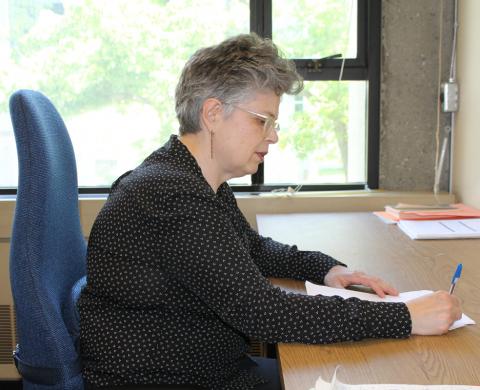
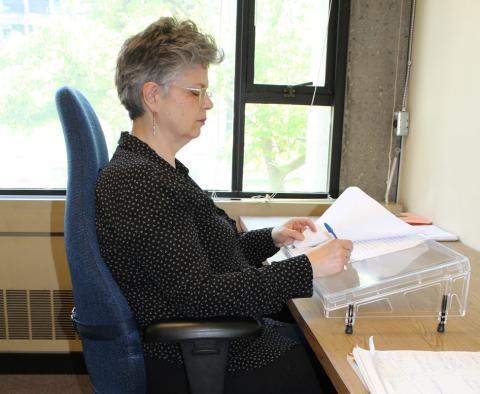
As a professor, instructor or teaching assistant, you can spend hours in awkward postures while marking. Taking micro-breaks and setting up your workstation to support neutral working postures  can reduce the risk of discomfort and injury.

Ideal positioning

Image
Proper marking

Tips:

  • Use an office chair that has a backrest and adjustable seat height and seat pan options. You should also find the chair comfortable.
  • Adjust the chair height so that the paperwork is approximately elbow level. Place a footrest under your feet if they are not fully supported by the floor.
  • Sit all the way back in the chair and allow the backrest to support your back.
  • Shoulders should be relaxed and elbows close to the body while marking.
  • Position yourself close to the desk to avoid leaning forward and reaching.
  • A sloped document riser is recommended to reduce neck and thoracic flexion.
  • Incorporate 1-2 minutes of stretching or micro-breaks every hour to provide position change and visual rest.

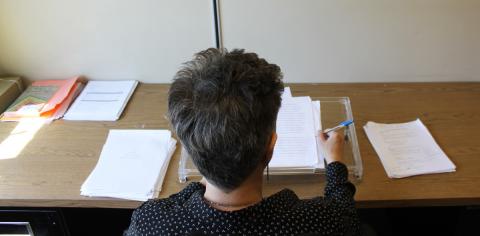
    Improper positioning

    Image
    Improper marking

Risks:

  • Neck flexion (looking down at paperwork) increases strain on the neck and shoulder musculature
  • Shoulder flexion (reaching forward) increases load on neck and shoulder musculature
  • Upper-back flexion (leaning forward) increases strain on shoulder and back musculature

Workstation layout

Image
Workstation ideal

Tips:

  • While marking, organize your paperwork in a sequential manner and make it easy to reach.
  • Reduce clutter and avoid placing distracting objects around the marking station.

By establishing the following workstation reaching zones, you can reduce the occurrence of reaching and awkward postures:

  • Primary zone: Frequent reaches to the keyboard/mouse and written work being marked should be kept within 36 cm/14.2″ of you.
  • Secondary zone: Infrequent reaches of items such as telephone, drinking cup, eraser or notebook should be kept within 50 cm/19.7″ of you.
  • Tertiary zone: Occasional reaches to seldom-used items such as textbooks or binders can be stored outside of the 50 cm range. If you need to reach for these items, try standing up to get as close as possible instead of bending forward from a seated position.

How you organize your workstation can contribute to improved productivity and mental wellbeing as much as your physical wellbeing. Arrange your workstation in a manner that works for you and allows you to separate marked and unmarked assignments.

Laptop work

If you are working for a sustained period, we recommend using an external monitor, keyboard and mouse. Please see the office ergo webpage for additional tips. 

Lecturing

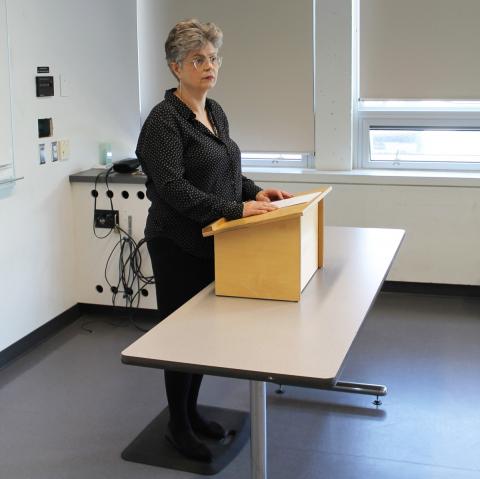
Lecturing may require professors to stand for up to three hours at a time. There is widespread knowledge regarding the negative health effects of static sitting; however, there is also evidence that static standing can lead to undesirable consequences such as low-back and knee pain, and varicose veins. Good standing posture is important to prevent discomfort, but it alone is not enough. You should also incorporate positional change, such as intermittent walking or sitting throughout the lecture.

Image
Standing posture

Tips:

  • Move and make positional changes before discomfort sets in, or aim to adjust your position at least every hour.
  • An anti-fatigue mat can be helpful if you experience lower-limb and back pain.
  • Consider using a stool to sit intermittently while lecturing.
  • Wear appropriate footwear.
  • Walk periodically instead of standing in one place.
  • Encourage students to take a stretch breaks every 50 minutes to give both you and the students a chance to make a positional change.

Breaks, pacing and positional Change

Look for opportunities to incorporate positional change in your workday and make an effort to take a micro-break (30 seconds to 2 minutes) at least every hour, preferably every 30 minutes.

The body’s soft tissues require rest in order to recuperate from the effects of the static postures we exhibit. Prolonged standing can lead to negative effects such as low-back, knee and lower leg discomfort, and varicose veins.

Consider changing between sitting and standing while lecturing , or incorporate walking if sitting is not practical. Use hourly breaks as opportunities for positional change by sitting to answer students’ questions or lead a classroom stretch session.

Be aware of your body’s warning signs of discomfort. Ideally, you should stop and take a break before discomfort sets in. Micro-breaks will allow your body’s tissue tolerance to recover near baseline and allow you to maintain productivity over longer periods of time spent working.

Office ergo reps

Find your department’s office ergo representative.

Office Ergo Reps can help you with initial set-up and problem solving. View a list of Office Ergo Reps (PDF) to find a rep in your department.

Become an Office Ergo Rep

Upcoming Office Ergo Rep Training: Ergo rep training is typically available in March of each year. Please email ergonomics.info@ubc.ca and we will add you to our list!

The Ergonomics program at UBC strives to have an Office Ergonomics Representative for each department. We provide the training (usually three hours) and material required for reps to promote, educate and ensure musculoskeletal health in their departments.

Office Ergo Reps are trained by the Ergonomics Coordinator in simple computer workstation set-up, signs and symptoms of injuries from poor ergonomic set-up and control strategies to reduce or prevent symptoms.

Benefits of having an Office Ergo Rep for your department

  • In-house ergonomics assistance for minor issues, office planning or ordering new equipment
  • Increased knowledge of departmental resources and equipment
  • Increased knowledge of specific task and environmental demands
  • Faster, more efficient response to ergonomic issues

Roles and responsibilities

  • Be a resource for ergonomics in your department
  • Educate your co-workers about risk factors and prevention strategies
  • Assist your co-workers in the optimal set-up of their workstation
  • Orient new employees and set-up their workstations ergonomically

Of course, our Ergonomics Coordinator is always available to help with more complicated ergonomic issues and privacy concerns.

Office Ergo Rep resources

Contact us

Email: ergonomics.info@ubc.ca  

Phone: 604-822-9040

Respectful environment

Building an environment of respect, diversity, opportunity and inclusion.

The Respectful Environment Statement speaks to our freedoms and our responsibilities, and provides the guiding principles to support us in building an environment in which respect, civility, diversity, opportunity and inclusion are valued.

The University of British Columbia envisions a climate in which students, faculty and staff are provided with the best possible conditions for learning, researching and working, including an environment that is dedicated to excellence, equity and mutual respect. The University of British Columbia strives to realize this vision by establishing employment and educational practices that respect the dignity of individuals and make it possible for everyone to live, work and study in a positive and supportive environment, free from harmful behaviours such as bullying and harassment.

Read the full Statement

Steps to resolve conflict

FAQs

UBC Retaliation Policy annual reports

UBC’s Retaliation Policy (SC18) requires the Vice-President, Human Resources and the Vice-President, Students offices to prepare a report each year regarding complaints of retaliation, the investigation of such complaints and the actions taken following any findings of retaliation.

The following annual reports are a consolidation of reports summarized by the University per the requirements of the Retaliation Policy.

UBC resources

Subscribe to
UBC Crest The official logo of the University of British Columbia. Urgent Message An exclamation mark in a speech bubble. Caret An arrowhead indicating direction. Arrow An arrow indicating direction. Arrow in Circle An arrow indicating direction. Arrow in Circle An arrow indicating direction. Time A clock. Chats Two speech clouds. E-commerce Cart A shopping cart. Facebook The logo for the Facebook social media service. Home A house in silhouette. Information The letter 'i' in a circle. Instagram The logo for the Instagram social media service. Linkedin The logo for the LinkedIn social media service. Location Pin A map location pin. Locked A locked padlock. Mail An envelope. Menu Three horizontal lines indicating a menu. Minus A minus sign. Pencil A pencil indicating that this is editable. Telephone An antique telephone. Play A media play button. Plus A plus symbol indicating more or the ability to add. Search A magnifying glass. Settings A single gear. Speech Bubble A speech bubble. Star An outline of a star. Twitter The logo for the Twitter social media service. Unlocked An unlocked padlock. User A silhouette of a person. Vimeo The logo for the Vimeo video sharing service. Youtube The logo for the YouTube video sharing service.